
How to Embed a Free Fear & Greed Index Widget on Any Site
6/12/2026

Looking for a free Fear & Greed Index widget for your website? Here is a live, auto-updating gauge you can embed on any site, blog, or newsletter landing page with one copy-paste snippet, no signup, no API key, and no license fee.
What Is the Fear & Greed Index?
The Fear & Greed Index is a market sentiment gauge launched by CNNMoney in 2012, in the aftermath of the global financial crisis. It compresses seven different measures of stock market behavior into one number between 0 and 100. A reading of 0 means maximum fear, 100 means maximum greed, and 50 is neutral.
The index is popular because it answers a question every investor asks in plain language: is the market driven by panic or by euphoria right now? Each of the seven inputs is compared against its own normal range, then all seven are weighted equally, according to CNN's methodology.
| Indicator | What it measures |
|---|---|
| Market momentum | S&P 500 versus its 125-day moving average |
| Stock price strength | Stocks hitting 52-week highs versus 52-week lows on the NYSE |
| Stock price breadth | Volume in advancing versus declining stocks |
| Put and call options | Put/call ratio: are traders buying protection or upside? |
| Junk bond demand | Yield spread between high-yield and investment-grade bonds |
| Market volatility | The VIX, Wall Street's "fear gauge" |
| Safe haven demand | Returns of Treasuries versus stocks |
Because the index blends momentum, options positioning, credit, and volatility, it moves fast when conditions change. That is exactly why a live widget beats a static image: sentiment from two weeks ago is trivia, sentiment today is information.
See the Live Widget in Action
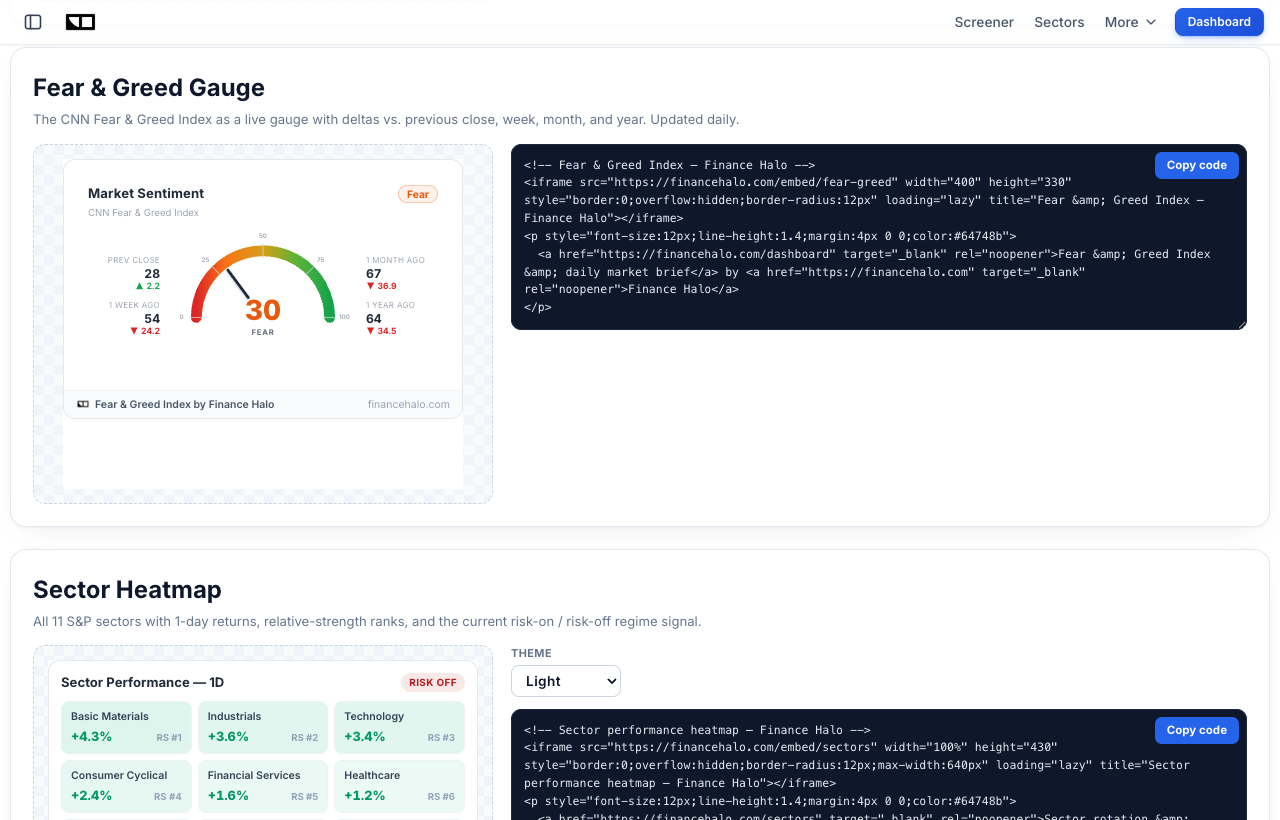
This is not a screenshot. The gauge below is the actual embedded widget, served live from Finance Halo and refreshed throughout the day. It shows today's score, the rating band, and how the reading compares with the previous close, one week ago, one month ago, and one year ago.
If you are reading this on a site that embedded the article, the gauge still works: the widget is a self-contained iframe, so it renders anywhere HTML renders.
How Do You Embed the Fear & Greed Widget?
Three steps, under a minute:
- Open the Finance Halo widgets gallery.
- Find the Fear & Greed Gauge card and click Copy code.
- Paste the snippet into your page where you want the gauge to appear.
The snippet looks like this:
<!-- Fear & Greed Index - Finance Halo -->
<iframe src="https://financehalo.com/embed/fear-greed"
width="400" height="330"
style="border:0;overflow:hidden;border-radius:12px"
loading="lazy"
title="Fear & Greed Index - Finance Halo"></iframe>
<p style="font-size:12px">
<a href="https://financehalo.com/dashboard">Fear & Greed Index & daily market brief</a>
by <a href="https://financehalo.com">Finance Halo</a>
</p>Two parts matter:
- The iframe renders the gauge. You can set
widthto100%for responsive layouts; keepheightat 330 so the delta panel is not clipped.loading="lazy"means it costs your page nothing until the reader scrolls to it. - The attribution line below the iframe credits the data source. The widget is free for personal and commercial use on the simple condition that this link stays visible and unmodified.
Adding the Widget to WordPress, Ghost, Notion, and More
WordPress
In the block editor, add a Custom HTML block where you want the gauge, paste the snippet, and preview. In the classic editor, switch the post to the Text (HTML) tab before pasting. No plugin is required, although page builders like Elementor accept the same snippet in their HTML element.
Ghost
Type /html in the editor to insert an HTML card, paste the snippet, and publish. Ghost newsletters strip iframes from emails, so the gauge appears on the web version of the post, which is where your SEO traffic lands anyway.
Notion
Notion does not need the full snippet. Type /embed, paste the widget URL directly (https://financehalo.com/embed/fear-greed), and Notion renders the live gauge inside the page. This works on public Notion sites too.
Substack and email newsletters
Email clients do not render iframes, so live widgets cannot run inside an email. The standard pattern: keep the live gauge on your site or landing page, and link to it from the newsletter. Substack's web posts do not currently allow custom iframes either, so use the widget on your own domain and treat it as a reason for readers to click through.
Any other site
Squarespace (Code block), Wix (Embed HTML), Webflow (Embed element), Carrd (Embed widget), and plain static HTML all accept the snippet as-is. If your platform lets you paste HTML, the widget works.
Why Not Just Screenshot CNN's Index?
Plenty of finance blogs paste a screenshot of CNN's gauge into their market posts, or hotlink the image. That approach has three problems. First, the number is frozen: sentiment readings go stale in days, sometimes hours. Second, CNN's chart is their copyrighted presentation, and hotlinking someone else's asset is fragile, the image can change or break without notice. Third, a static image gives your readers nothing to interact with and gives your page no reason to be revisited.
The other common route is TradingView's widget library. It is excellent for charts, but it does not include a Fear & Greed gauge, and the free widgets come with TradingView branding and links on TradingView's terms. Here is how the options compare for the specific job of showing market sentiment:
| Option | Live data | Fear & Greed gauge | Cost | Setup |
|---|---|---|---|---|
| Screenshot of CNN's page | No, frozen at publish time | Yes, but static | Free, copyright gray zone | Manual, must be redone constantly |
| TradingView free widgets | Yes | No sentiment gauge | Free with required branding | Copy-paste |
| Finance Halo widget | Yes, auto-refreshing | Yes, with 1-week/1-month/1-year deltas | Free with one attribution link | Copy-paste, under a minute |
If you publish market commentary, the live gauge also quietly upgrades old posts: an article you wrote last quarter still shows today's sentiment instead of a stale number.
How to Read the Gauge
The widget maps the 0-100 score to five bands:
| Score | Band | Typical interpretation |
|---|---|---|
| 0-25 | Extreme Fear | Panic conditions, historically where contrarian buyers get interested |
| 26-44 | Fear | Risk appetite is weak, defensives and safe havens outperform |
| 45-55 | Neutral | No strong sentiment edge either way |
| 56-74 | Greed | Risk-on, momentum trades crowded |
| 75-100 | Extreme Greed | Euphoria, historically where corrections find their fuel |
The classic use is contrarian, in the spirit of Warren Buffett's line about being fearful when others are greedy and greedy when others are fearful. Extreme Fear readings have historically clustered around market bottoms, like March 2020, while Extreme Greed often precedes pullbacks. The widget's delta panel matters here: a score of 30 that was 67 a month ago tells a very different story than a 30 that has been pinned low for a year.
Sentiment is one input, not a trading system. Pair it with an understanding of the difference between a correction and a bear market, and if the gauge has you nervous, with a plan for hedging your portfolio when risk spikes.
The Other Free Widgets: Live Charts and Sector Heatmap
The same gallery includes two more embeddable widgets, configured with the same copy-paste flow:
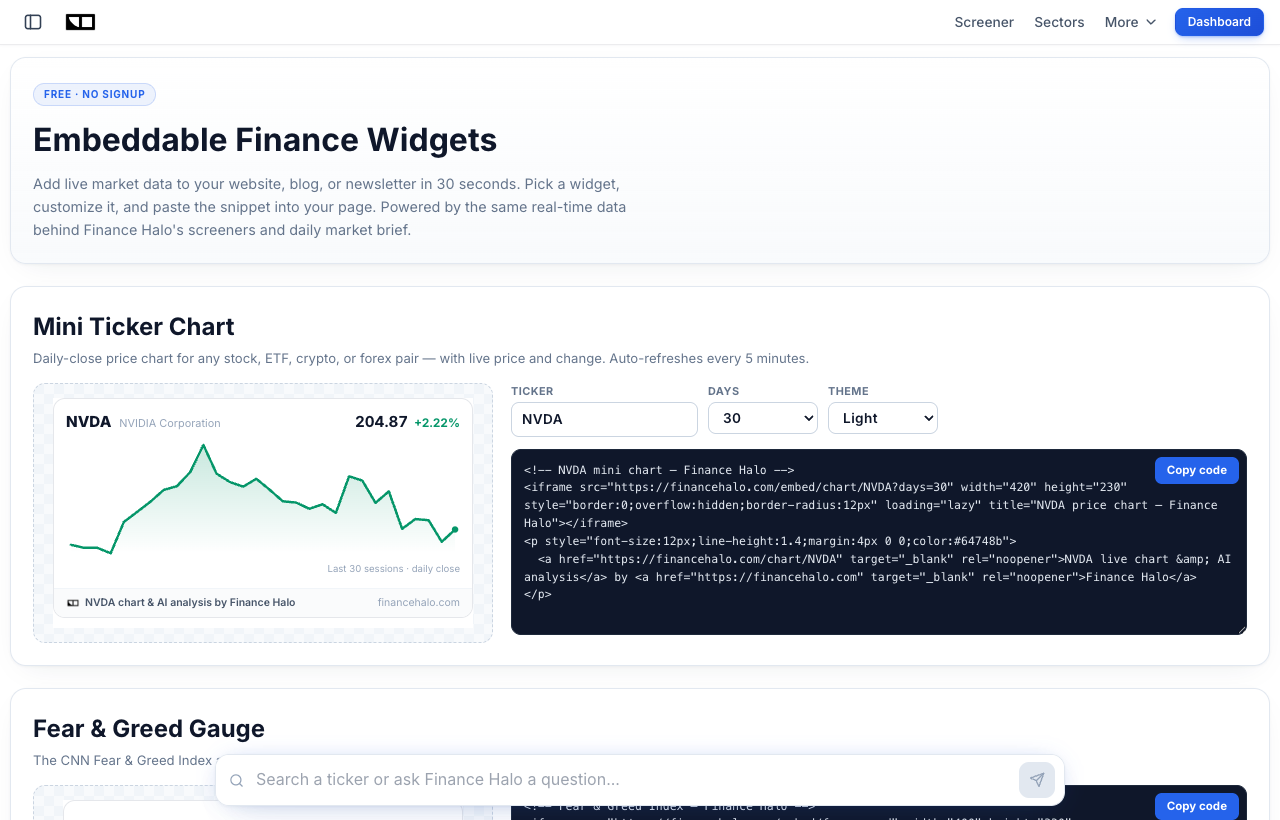
- Mini ticker chart: a live daily-close price chart with current price and percent change, for any stock, ETF, crypto, or forex pair. Writing about NVIDIA? Embed the NVDA chart and your article shows the live price forever.
- Sector heatmap: all 11 S&P sectors with 1-day returns, relative-strength ranks, and the current risk-on or risk-off rotation signal, useful for any post about sector rotation or market breadth.
Both support a dark theme via a single URL parameter, and both carry the same terms: free, with the attribution link kept intact. If you screen stocks for your articles, the free market screener pairs naturally with the chart widget: find the setup in the screener, embed the chart in the post.
Where the Data Comes From
The widget is powered by the same data pipeline behind Finance Halo's Market Intelligence dashboard, which tracks the CNN Fear & Greed Index alongside market regime, sector rotation, and breadth statistics, and refreshes throughout the trading day.
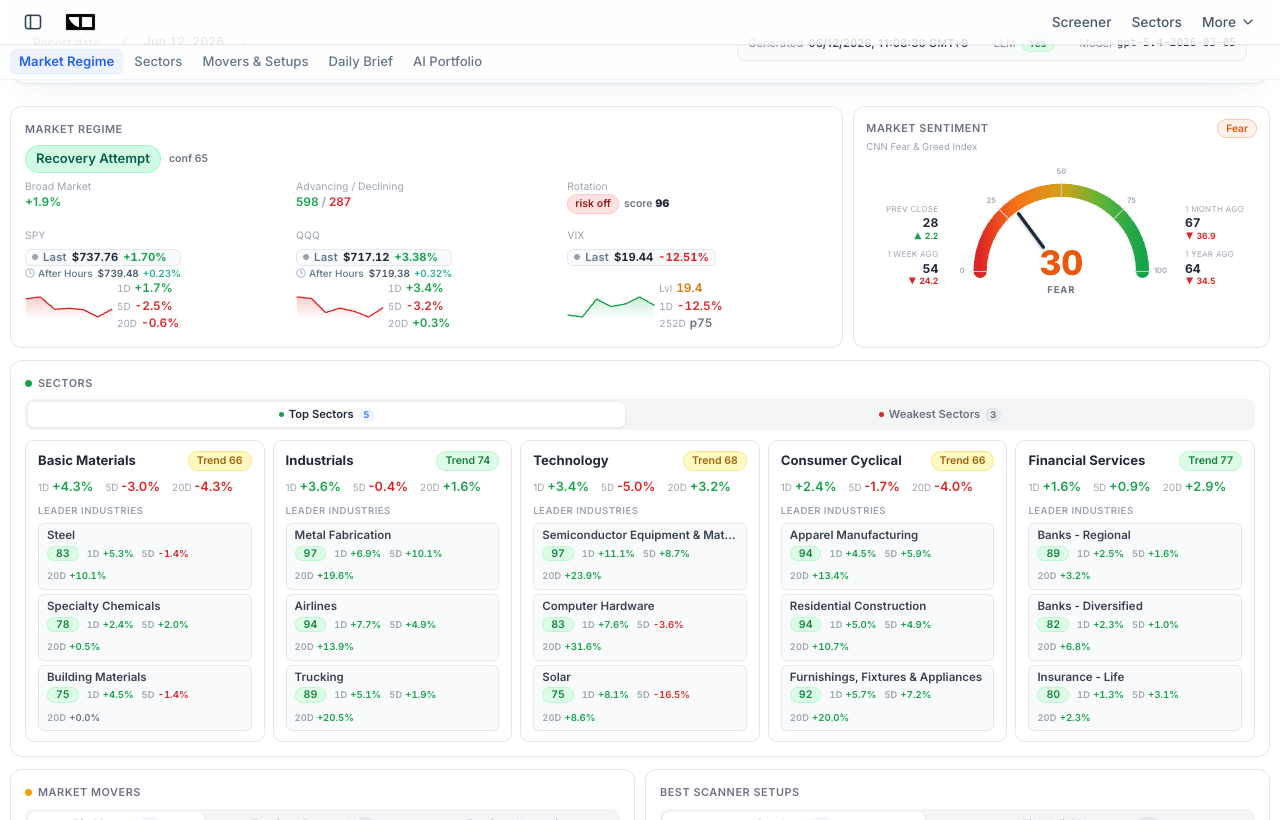
If you want the context behind the number, you can read today's AI-generated market intelligence report, which covers what moved sentiment and how the AI portfolio is positioned in response. For background on the index itself, CNN's own explainer of how the Fear and Greed Index works and Investopedia's Fear and Greed Index definition are good reads.
Common Mistakes to Avoid
- Removing the attribution link. It is the only condition of use. Strip it and you are out of the license terms; keep it and the widget is free forever.
- Pasting the snippet into a rich-text field. Visual editors escape the HTML and your readers see code instead of a gauge. Always use the platform's HTML/embed block.
- Cropping the height. Setting the iframe below 330 pixels clips the delta panel, which is the most informative part of the widget. Resize the width, not the height.
- Expecting it to render in email. No email client runs iframes. Put the widget on your site and link to it from the newsletter.
- Treating the score as a buy or sell signal. Extreme readings mark conditions, not timestamps. A market can stay greedy for months. Use the gauge as context alongside fundamentals and your own risk plan.
- Embedding five widgets on one page. One or two live elements enhance an article; a wall of iframes slows the page and dilutes the point.
Frequently Asked Questions
Is the Fear & Greed Index widget really free?
Yes. There is no account, no API key, no trial period, and no usage cap. The single condition is that the attribution link included in the embed code stays visible and unmodified under the widget.
How often does the widget update?
The underlying index data refreshes throughout the trading day, and embedded widgets pick up new data within minutes thanks to a 5-minute cache. Readers always see the current score without you touching anything.
Does the widget slow my site down?
No. The snippet ships with loading="lazy", so the iframe does not even load until the reader scrolls near it, and the widget page itself is a few kilobytes of server-rendered HTML with no heavy chart libraries.
Can I use the widget on a commercial website?
Yes, commercial use is explicitly allowed, including monetized blogs, newsletters with paid tiers, and company sites, as long as the attribution link remains.
Does it work in WordPress without a plugin?
Yes. The built-in Custom HTML block in the Gutenberg editor is enough. You only need the Text tab in the classic editor. No plugin, no shortcode.
Is there a dark mode?
The Fear & Greed gauge currently ships in its light card style, which sits cleanly on both light and dark pages. The mini chart and sector heatmap widgets accept a theme=dark URL parameter in the gallery's code generator.
What is a good Fear & Greed score to buy at?
There is no magic number. Historically, Extreme Fear readings below 25 have coincided with attractive long-term entry points more often than Extreme Greed readings above 75, but sentiment is one input. Combine it with valuation and a strategy like the ones compared in dollar-cost averaging versus lump-sum investing.
Conclusion
A free Fear & Greed Index widget is the rare website upgrade that takes less than a minute and keeps paying: your market commentary always shows live sentiment, your readers get an interactive element instead of a stale screenshot, and you never have to update it. Copy the snippet from the gallery, paste it into an HTML block, keep the attribution line, and you are done. If you also want live price charts or a sector rotation heatmap, the same gallery covers those with the identical copy-paste flow.
Try it yourself: Grab the free Fear & Greed Index widget for your site, and use Finance Halo's AI assistant to get instant analysis on any stock. Just type a ticker and ask your question.
Disclaimer: This article is for educational purposes only and does not constitute investment advice. Always do your own research before making investment decisions.